- Foresight Life
Golf simulators – an introduction

Welcome to Part 1 of our Golf Simulator Guide. In this post we will look at what golf simulators, how they work, what they can be used for, and the different types of golf simulator.
Indoor home golf simulators are soaring in popularity. Fuelled by improvements in technology, increased affordability and an ever-increasing appreciation for the game, the sales of indoor golf simulators in the UK, Europe and beyond – both for homes and for businesses – is increasing all the time.
Golfers love the ability to play whenever they want, regardless of the weather or time of day. Golf simulator technology now provides an unprecedented platform with which to improve your golf, not to mention the capacity for socialising and family entertainment.
This guide provides an introduction to golf simulators, covering everything you need to know about how they work, the different types available, and the components that make up a simulator.
What is a golf simulator?
Put simply, a golf simulator is a combination of hardware and software that allows golfers to play and practice, without the need for a golf course or driving range.
They can range from basic DIY options powered by a mobile phone or tablet app, all the way up to a custom simulator building with a bespoke design and the most advanced launch monitor technology available in the industry.
This article will explain the basics so you know what to look for, what to ask about, and how to decide the best golf simulator for your needs.


How do golf simulators work?
At the heart of every golf simulator is a piece of technology attempting to measure the initial flight of the golf ball in order to accurately represent the full flight. That technology then connects with golf simulation software, such as Foresight Sports’ FSX 2020. The software can either be projected onto a hitting screen, or viewed on a separate monitor while a ball is hit into a net.
The measurement system is the most crucial factor in determining the realism and accuracy of a simulator solution. It is the one thing that controls whether the experience is representative of the ball flight that the golfer would see when hitting balls outside.
The type of system measuring the golf ball varies across different golf simulator options. The most common measurement systems are camera, radar and infrared tracking. In some cases the measurement system is designed, and built, as part of the simulator and is therefore limited to a golf simulator solution.
The other type of measurement system is a launch monitor. A launch monitor is a piece of technology that is entirely designed to measure the golf ball – and in some cases the golf club – as accurately as possible.
Launch monitors have been used in the golf industry for testing, coaching, club fitting and on all the major Professionals Tours for well over a decade. Launch monitors also have the advantage that they are portable and can be used for different applications in a number of environments, both inside and outside.
The more advanced simulator technologies are also able to measure the golf club delivery, and the club-face at impact, in order to describe how the golf club caused the resulting ball flight. You can learn how Foresight Sports technology measures the golf club and golf ball and what the data means with our What We Measure guide.

When using a golf simulator
- The player hits a shot
- The shot is analysed by the measuring hardware or launch monitor
- The launch monitor sends the shot data instantly to the simulation software
- The software depicts the flight of the golf ball on the mobile, tablet, computer monitor and / or projection impact screen
- The ball flight data may be used to play a hole on a virtual golf course, on a virtual driving range, or in a game or skill-building challenge incorporated into the software
- Shot data can then be accessed in the simulator software – depending on the launch monitor, this can include golf ball data, or golf ball and golf club data
Different types of golf simulators
In addition to the measurement systems mentioned above, simulators can also vary depending on factors such as structure, flooring and how visually immersive they are.
The choice of simulator type will be determined by a combination of the golfer’s space, budget, and personal preferences.
Projected golf simulators
The most common type of simulator – the style that most golfers and many non-golfers are familiar with – features the software projected onto a hitting screen via a projector. The player hits the shot into the screen, and the path of the ball flight is projected onto the screen. This allows the golfer to see where the ball would have gone on a real-world course or range, providing an immersive and realistic experience.
Typically, projected simulators will be built into a dedicated space with a permanent structure that provides side wall and ceiling protection, and therefore can require more room than alternative options.

Net golf simulators
Alternatively, the golfer can strike the ball into a hitting net and view the simulation on a laptop or separate computer or television monitor. This is a less costly type of simulator and typically seen as more of an entry-level system; however, it does provide great flexibility.
Net-based golf simulators require less space than a projected screen system; they can be packed away and stored in a matter of minutes, and can be used both indoors and outdoors (depending on the launch monitor being used).
Net-based simulators are also often the choice of golfers who don’t have the budget for a full projected simulator but choose to prioritise investing into the quality of the technology measuring the golf ball over the look or feel of the simulator space itself.

Sim-in-a-Box Performance Simulators
Another option available from Foresight Sports Europe is a DIY installation Performance Simulator package. The Performance Simulator gives a projected simulation experience but can still be broken down and packed away when not being used. This offers a great blend between a net simulator and a traditional projected sim in a permanent structure.

What can a golf simulator be used for?
Although most sim owners will use theirs in a fairly specific way, there are a huge number of uses and benefits of an indoor golf simulator. Depending on the sophistication of the launch monitor, there is no reason that a golf simulator can’t be used for most or all of the following.
- Playing golf whenever you want – any time, any weather
- Family entertainment
- Entertaining and socialising with friends
- Introducing kids or new players to golf
- Competing against other players online
- Playing world famous golf courses
- Skill challenges and competitions
- Enhancing specific shots or clubs (drivers, irons, short game, putting)
- Developing muscle memory and golf swing consistency
- Golf coaching
- Golf club gap-testing
- Golf club-fitting
- Golf ball data analysis
- Golf club data analysis
- Testing new golf clubs
Golf simulator components
One of the most asked questions we receive is: ‘what do I need for an indoor home golf simulator?’
Due to the variety of simulator types and the various available set-ups within each type – catering to a wide range of budget and space requirements – the components needed can also greatly vary.
While all simulators need a few core components for basic functionality, there are many other options that can be included. Additionally, a wide spectrum of quality and specifications are available for each element of a golf simulator.
Space, budget, design taste and functionality requirements will all play a part in deciding the right simulator for your needs. This section will cover all the potential components of an indoor golf simulator, from the most basic and cost-effective net sim, up to the most advanced and luxurious custom-built simulator room.
Another factor to consider is that many golf simulator customers start with a more entry-level set-up and then add additional components over time to build-up to their dream simulator environment.
We covered the difference between net-based and projection-based simulators earlier on; this is the first decision to make. If you opt for a net-based simulator without a projected image, your set-up can be as straightforward as a hitting net, a hitting mat, a laptop and a launch monitor.
If you opt for a projected image simulator, you will need a hitting screen instead of a net, and a more comprehensive list of components.
We will explore this topic in much greater detail in our guide to Golf Simulator Components. For our introductory guide, the following list explains all the different parts of a golf simulator that you will need to know.

Hitting Net
(non-projected simulators)
A net to hit the golf ball into, typically used for an entry-level simulator that won’t include a projected image on a screen. Great for indoor and outdoor use in limited space.

Simulator structure or enclosure (projected simulators)
The enclosure that will house the components of your golf simulator. This can range from a simple fabric enclosure to a hard-panelled structure built into a room.
Launch Monitor / Measuring Technology
The system that measures the golf ball. This system is entirely responsible for how realistic and accurate the simulator experience is. The type of measuring system varies across different simulator options.
A Foresight Sports golf simulator uses a launch monitor to measure the golf ball. A launch monitor is a piece of technology solely designed to measure the golf ball as accurately as possible, across a number of indoor and outdoor environments.
Using a launch monitor to provide the ball flight within a golf simulator is the best of both the launch monitor and golf simulator worlds and provides the most accurate solution.


Software
The computer programme or app that will show your simulated ball flight. Depending on the software, this can be on simulated driving ranges, golf courses, or in games or skill-building challenges.

Hitting screen
The screen that you hit the golf ball into, and that displays the projected image of your simulation software.

Hitting Mat
A piece of artificial turf that you strike the ball from. Typically, the golfer will also stand on the hitting mat, but it can be a simple strip of turf for the ball to sit on.

Artificial Turf and Sub-floor
The area surrounding and below the hitting mat in a fully-installed simulator.

Floor boxes for cabling
Protective casing to hide and prevent damage to cables for the launch monitor and computer systems.

Computer
The computer used to power the simulator software. Depending on the simulator type, this could be a laptop on a stand, or desktop computer housed in a protective cabinet.

Monitor(s) for computer
A separate monitor (or monitors) for systems using a desktop computer, used to view the simulation software. Advanced simulators can include multiple screens.
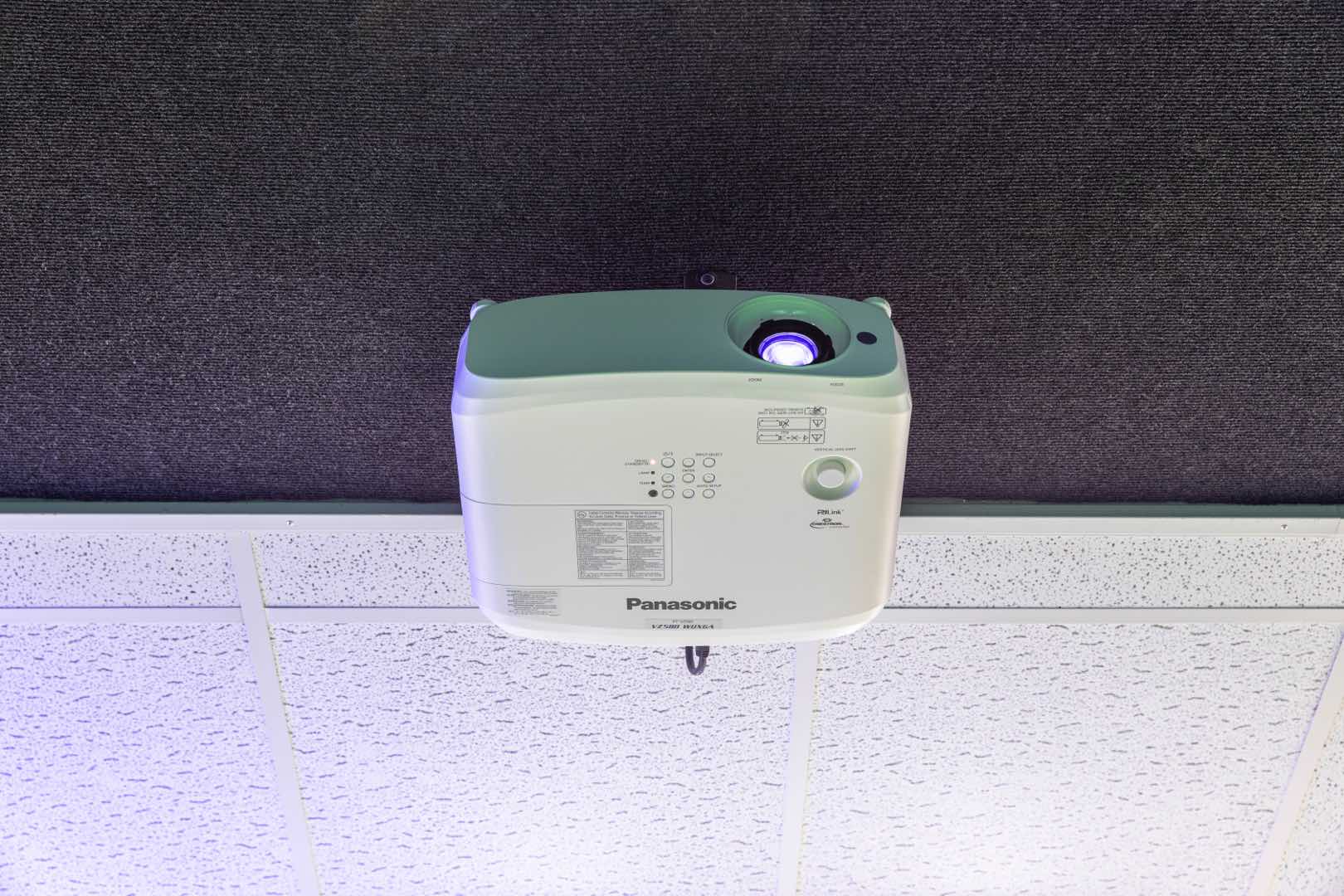
To project the simulation software image onto the hitting screen in front of the golfer.
Read the next article in our Golf Simulator Guide to learn in more detail about the individual components of a simulator.
You are also welcome to explore our PEAK online education platform. The training will help you understand how to read and interpret launch monitor data and let you hone in on target areas to improve your golf.


